


Recommended

Triton Multiplayer Roulette

Crazy Time

Speed Roulette

Speed Baccarat A

Motion Roulette

Andar Bahar
New Games

Sic Bo

Triton Multiplayer Roulette

Andar Bahar

Lightning Bac Bo

Football Thrill

Andar Bahar 5000x
NEW: Playtech

Mega Fire Blaze Roulette Live

Adventure Beyond Wonderland

Dragon Tiger

Hindi Roulette

Speed SicBo

Andar Bahar
Indibet APK India 2026
The Indibet APK gives Android users in India a direct mobile route into sports betting, casino games, live casino, payments and account tools. This guide explains how to download safely, install the app, log in, manage payments, verify KYC and avoid fake APK risks. It is written for players who want the convenience of mobile access without treating every download link as safe.
The main Indibet overview covers the sportsbook, casino and bonus context behind the Android route.
Android users should download the Indibet APK only from the official Indibet mobile route, then install it after checking device permissions, account login and update prompts. The app experience can support sports markets, casino games, live betting, payments, OTP security, KYC uploads and responsible gaming settings. iPhone users can use mobile browser access through Safari or another supported browser and follow any official account instructions.
| APK area | What to check | Where to verify |
|---|---|---|
| Device | Android phone with current browser/security settings | Phone settings |
| Download | Official Indibet APK route only | Mobile page |
| Login | Username, password, OTP or security prompt | App login |
| Products | Sportsbook, casino, live casino, promotions | App lobby |
| Payments | UPI, IMPS, Net Banking, cards, wallets, crypto where active | Cashier |
| KYC | Government ID, address proof, payment ownership | Verification area |
| Updates | Current APK version and app prompts | Official mobile route |
| iPhone access | Safari or mobile browser account route | Browser account |
Why use the Indibet APK
The main appeal of the Indibet APK is speed and convenience. Android players can open the account from the phone, move between cricket markets, other sports, casino games, live casino, promotions and cashier tools without relying only on desktop access.
For general mobile features beyond the install file, the Indibet app page explains interface, functions and device access.
For Indian users, mobile matters because betting and gaming often happen around live events. Cricket odds, in-play markets, casino sessions, payment checks and support messages all benefit from a clean mobile interface. A dedicated Android route can make that flow smoother when it is installed from the right place.
The safety rule is simple: APK convenience is valuable only when the file comes from the official route. A third-party APK can look real while stealing login details, OTPs, payment data or KYC documents.
APK safety checklist
Before installing anything, check the route, file origin and permissions. If a download comes from a chat group, unknown mirror, social post or unofficial bonus page, do not use it.
| Safety check | Why it matters | Good action |
|---|---|---|
| Official route | Prevents fake app downloads | Use the official Indibet mobile route |
| File name and page | Reduces phishing risk | Check brand and URL before download |
| Permissions | Protects phone data | Avoid excessive permissions |
| Updates | Keeps app stable and safer | Use official update prompts |
| OTP privacy | Prevents account takeover | Never share OTP codes |
| Payment security | Protects UPI, cards and wallet data | Pay only through logged-in cashier |
| KYC uploads | Protects documents | Upload only inside account verification |
How to install Indibet APK on Android
- Open the official mobile route
Use the official Indibet website or app page from your Android phone. Avoid search-result ads, Telegram links, social download buttons and pages that ask for unusual permissions.
- Download the APK file
Tap the APK download button only from the official route. Wait for the file to complete before opening it, and do not rename or move files from unknown sources into the install process.
- Allow installation carefully
Android may ask permission to install an APK. Allow it only for the current official file, then turn off broad unknown-source permissions if your device settings require it.
- Install and open the app
Open the app and check that the login screen, brand interface, terms links and support access look consistent. If anything looks unusual, stop and verify through support.
- Log in or register
Use your Indibet credentials or create an account with accurate details. Confirm OTP or email prompts if they appear and do not share codes with anyone.
- Check updates and account tools
Open the lobby, cashier, promotions, KYC section and responsible gaming settings. If the app asks for an update, follow the official route again.
If you are creating a new profile from Android, complete Indibet registration first with accurate personal and contact details.
What you can do inside the app
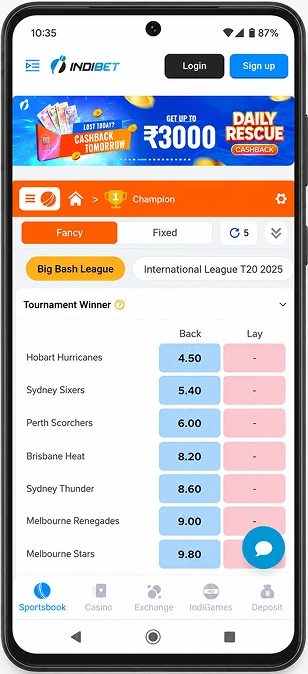
The Indibet mobile experience is built for account-based use. From the app, players can move through sports markets, casino games, live casino, promotions, cashier actions and support. The value is not only faster access; it is having account controls on the same device used for OTP and payments.
Useful app actions include:
- checking cricket and other sports markets;
- opening casino and live casino sections;
- reviewing promotions before deposit;
- depositing through active cashier methods;
- requesting withdrawals when available;
- uploading KYC documents if prompted;
- contacting support;
- setting limits and safer play controls.
Payments through the APK
Payments through the app should still go through the logged-in cashier. Indibet India payment categories include UPI, IMPS, Net Banking, debit cards, credit cards, wallet-style routes and crypto where active in the account.
Before using the cashier, review Indibet payments to check active routes, limits, KYC and withdrawal status.
Before confirming payment, check method, amount, bonus impact, KYC messages, fees, currency and transaction reference. Mobile payments are convenient, but they also make it easy to rush. Read the confirmation screen before approving a UPI request, bank transfer, card deposit or crypto transaction.
For withdrawals, verify KYC and bonus status first. A withdrawal can be held for document review, payment ownership checks, bonus wagering or internal account review. The app should be used to monitor messages and transaction status.
iPhone and browser access
iPhone players can use Indibet through mobile browser access, such as Safari, and manage account actions through the official route. The browser path is useful for login, promotions, cashier checks, KYC prompts and support without installing an Android APK.
Keep the browser updated, use the official address, avoid public Wi-Fi for payments and do not save passwords on shared devices. If account instructions show a device-specific route, follow the instructions from inside the official account.
Troubleshooting
| Issue | Likely reason | What to do | Where to verify |
|---|---|---|---|
| APK will not install | Device setting, old file, storage issue | Recheck source, storage and install permission | Android settings |
| Login fails | Wrong password, OTP issue, old app version | Reset carefully or update through official route | App login |
| OTP not received | Network, wrong number, SMS delay | Check phone number and resend | Account login |
| App crashes | Cache, outdated APK, device compatibility | Clear cache and update | App settings |
| Deposit pending | Bank/provider delay or cashier review | Save reference and monitor status | Cashier, history |
| KYC upload fails | File too large, blurry image, unstable connection | Upload clearer files | Verification area |
| Fake APK concern | Download came from unofficial route | Stop using file and change password | Official support |
Where to verify app and APK details
The official Indibet mobile route, app login screen, account area, cashier, KYC section and support channel are the practical checkpoints. Avoid any download page that does not connect back to the logged-in account or official support.
If you contact support, include your device model, Android version, app version if visible, error message, screenshot, time of issue and whether the problem affects login, cashier, games or KYC.
FAQ
How do I download the Indibet APK in India?
Use the official Indibet mobile route from your Android phone and download the APK from there only. Avoid third-party APK websites, social links or chat group files. After installation, check login, cashier, support and update prompts inside the app.
APK files are for Android devices. iPhone users can use the official mobile browser route through Safari or another supported browser. Do not try to install Android APK files on iOS devices or use unofficial tools that claim to convert them.
Yes, the Android app route can support account registration or login. Enter accurate personal details, confirm OTP if requested and check the account area before depositing. The details you enter may later be compared with KYC documents and payment ownership.
Yes, deposits can be managed through the cashier if the method is active in your account. Check UPI, IMPS, Net Banking, cards, wallets or crypto only when shown in the app cashier. Confirm amount, fees, bonus effect and reference before completing payment.
Common causes include device storage, Android install settings, an outdated APK file or a download from the wrong route. Delete suspicious files and download again only from the official mobile page. If the issue continues, contact support with device details.
The account can request KYC documents such as government ID, address proof or payment ownership evidence. Upload them only through the official account verification route. Use clear, complete and current files to avoid repeated review requests.
Use the official mobile route or in-account update prompt. Do not update through random APK sites, even if they show a newer version number. An unofficial update can expose login, payment and document data.
Stop using it immediately, uninstall the file, change your account password from a safe browser, review payment activity and contact support. If you entered payment or KYC details, monitor your bank, wallet and account messages carefully.
Responsible gaming
Mobile access can make betting and casino play more frequent. Set limits before playing, avoid chasing losses and take breaks during long sessions. If gambling starts to feel difficult to control, use account limits, time-outs or self-exclusion tools.
Editorial check
This APK guide keeps app safety, payment, KYC and device checks tied to official account routes. APK updates, cashier options and account requirements should be verified in the official mobile flow before action.
Last checked: 31 May 2026.